Visit Japan Web Guide 2026: Registration Steps, Family Members and Using the QR Code at the Airport
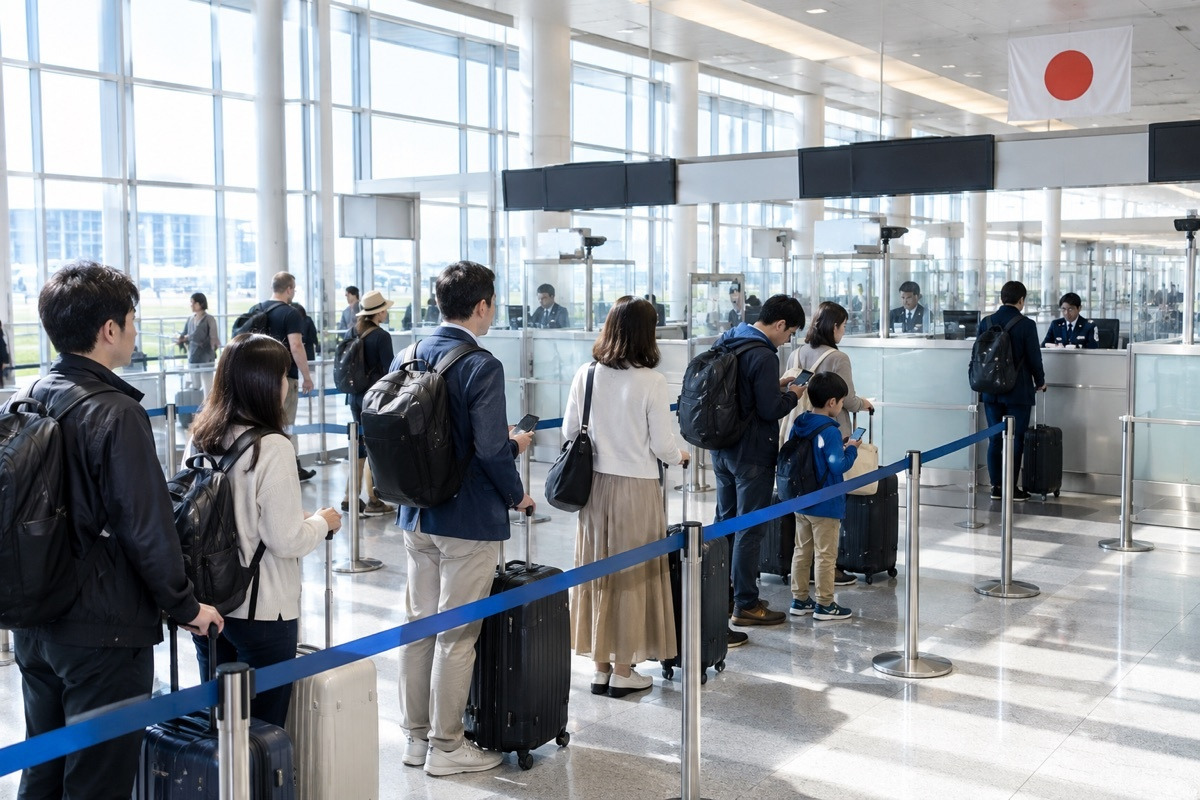
This is a practical Visit Japan Web guide covering the 5 steps from creating an account to getting your QR code, how to add family members, and how to use it at the airport.
- Visit Japan Web is a free website from Japan's Digital Agency: fill in immigration and customs details in advance, then show one QR code at the airport
- You don't have to use it: besides filling it in online, you can fill in a paper disembarkation card and customs form on the plane or at the airport on arrival day; going digital just makes arrival easier
- You can fill it in once your flight is booked. Finish it before you fly and stay logged in, so the QR code still shows without internet on landing
- Kids and family can go under one account, but everyone needs their own QR code; siblings and friends need their own accounts
- With lots of luggage, older parents and kids, or a late arrival, book an airport transfer in advance and go straight to your hotel
What is Visit Japan Web, and do I have to use it?
Visit Japan Web is Japan's Digital Agency website for arrival procedures. It moves two forms you would otherwise fill in on paper online: the disembarkation card for foreign nationals and the customs declaration. Since January 2024 both have been combined into a single QR code that you show at immigration and again at customs. It is not a visa; it simply gets your arrival paperwork ready ahead of time.
Do you have to use it? Not necessarily. There are two ways in: fill in Visit Japan Web online before you fly, or fill in the paper disembarkation card and customs declaration on the plane or at the airport on arrival day. Both get you through, and paper is fine for older travellers who prefer not to use a phone. The digital version, though, keeps your account for your next trip and lets you use kiosks and customs e-gates, so arrival is usually quicker. The same site also handles tax-free shopping in Japan, and when you leave from 7 airports including Narita, Haneda and Kansai you can complete the tax refund check online through it.
When should I fill it in, and what do I need?
The official rule is to finish before you reach immigration, and arrival dates can be registered up to 31 December of the following year, so you can fill it in as soon as your flight is booked. The safest approach is to finish at home before you leave and stay logged in, so the QR code shows even if you have no connection on landing. You can fill it in on a computer, but you must show the code on a phone or tablet at the airport.
| What to have ready | Used for |
|---|---|
| Email address | Creating an account, receiving the verification code |
| Passport | Your and your family's details |
| Flight ticket | Arrival date, airline, flight number, departure city |
| Accommodation | Hotel name and address in English, postcode, phone number |
| Luggage list | Alcohol, tobacco and perfume quantities for customs |
Recommended browsers: Safari or Chrome on iPhone, Chrome on Android and computers, all on the latest version.
How do I fill in Visit Japan Web? 5 steps in order
The official flow runs from STEP 0 to STEP 4; follow it in order and you won't miss anything. The site is available in English, Traditional and Simplified Chinese and Korean, so you don't need to read Japanese.
- Create an account with an email and password. On the official site, tap "Create new account", agree to the terms, then enter your email and a password of at least 10 characters with upper and lower case letters, numbers and symbols. After the verification check, enter the code sent to your inbox; keep that screen open while you wait for the email.
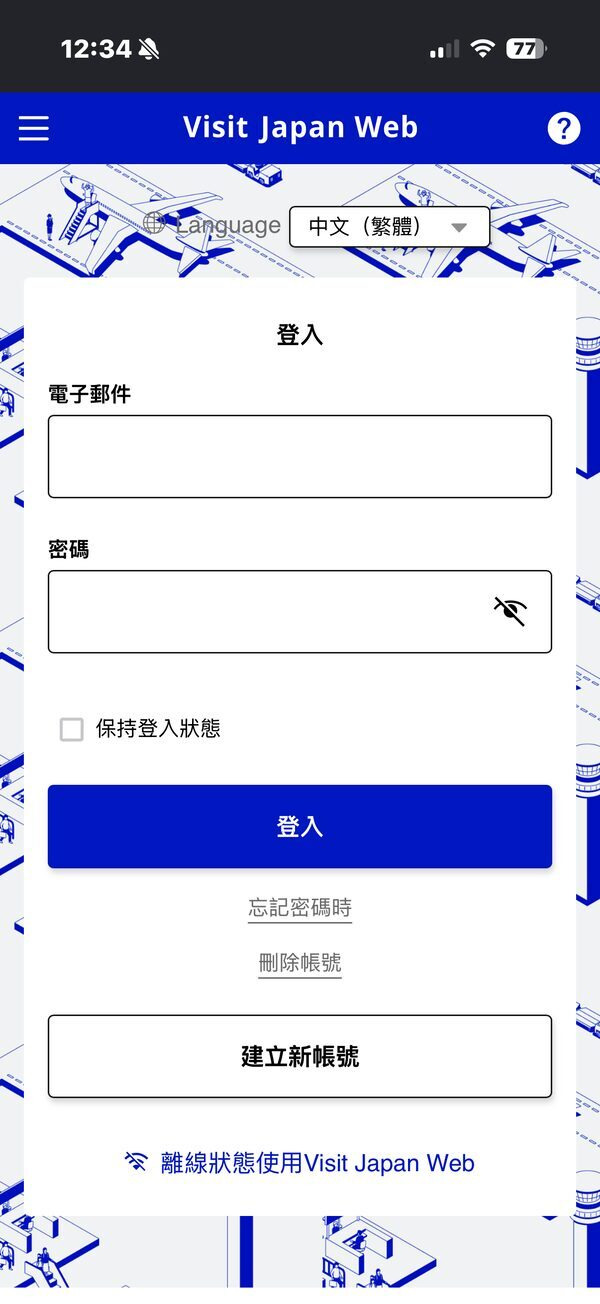
Create an account - Register yourself and your family: scanning the passport is fastest. Open "Your details" on the home screen, answer "No" to the first two questions (Japanese passport, re-entry permit), then scan your passport and check the passport number, name, date of birth and expiry date. Add each family member travelling with you from the family section on the home screen.
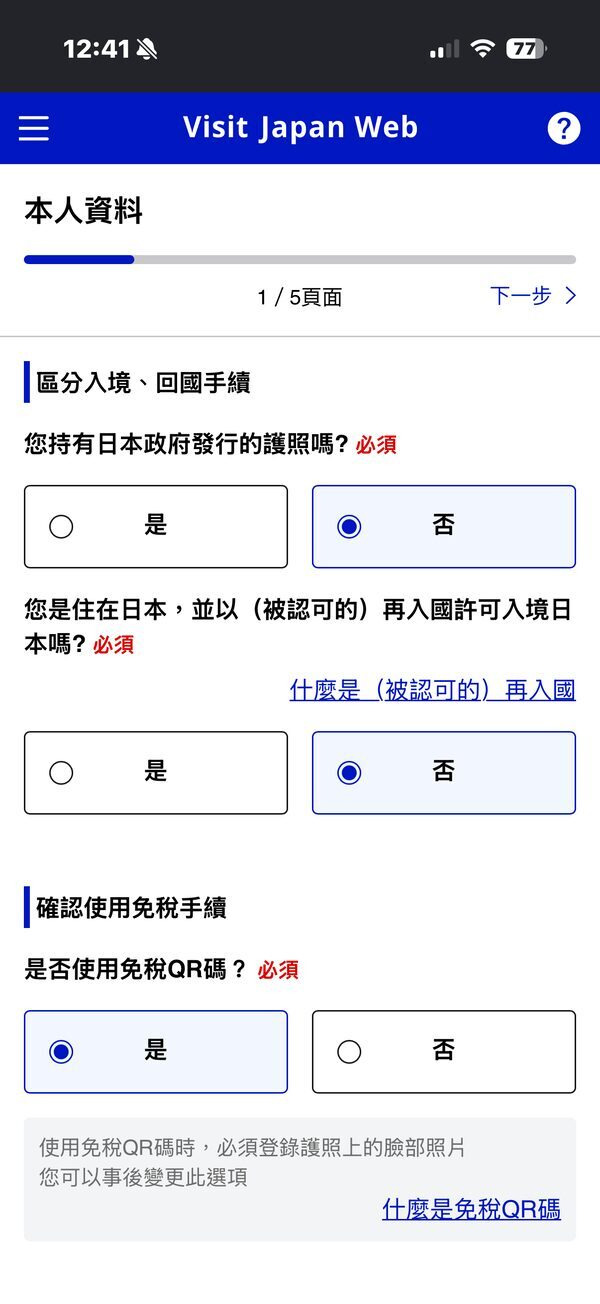
Answer "No" to the first two 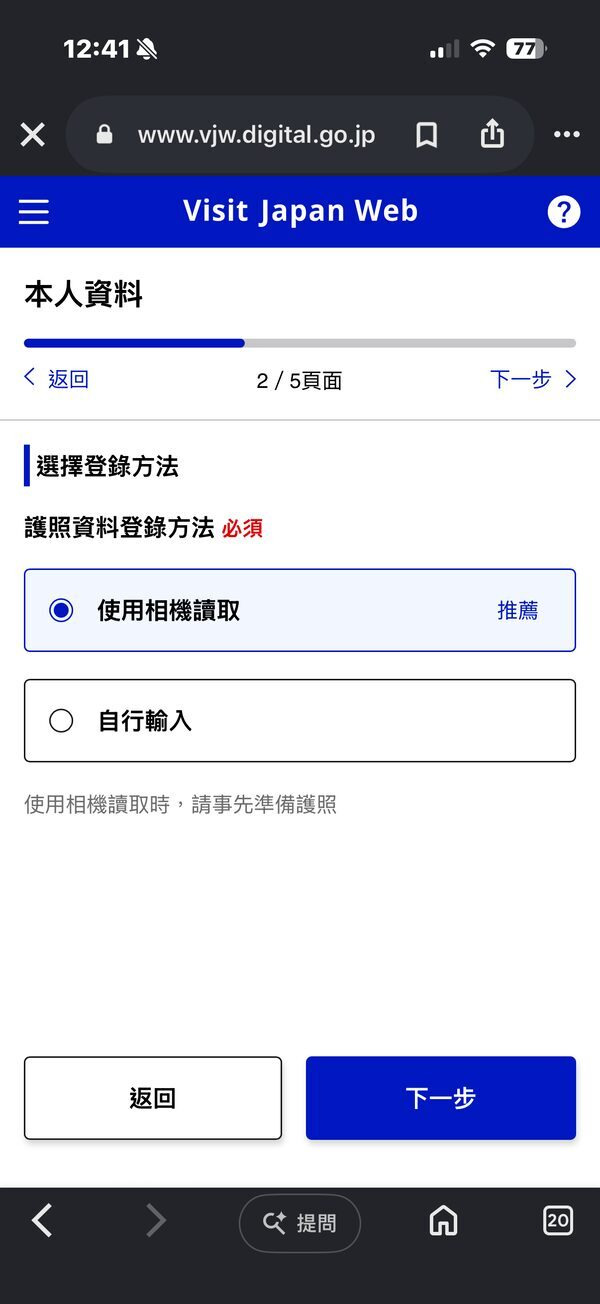
Choose "Use camera" 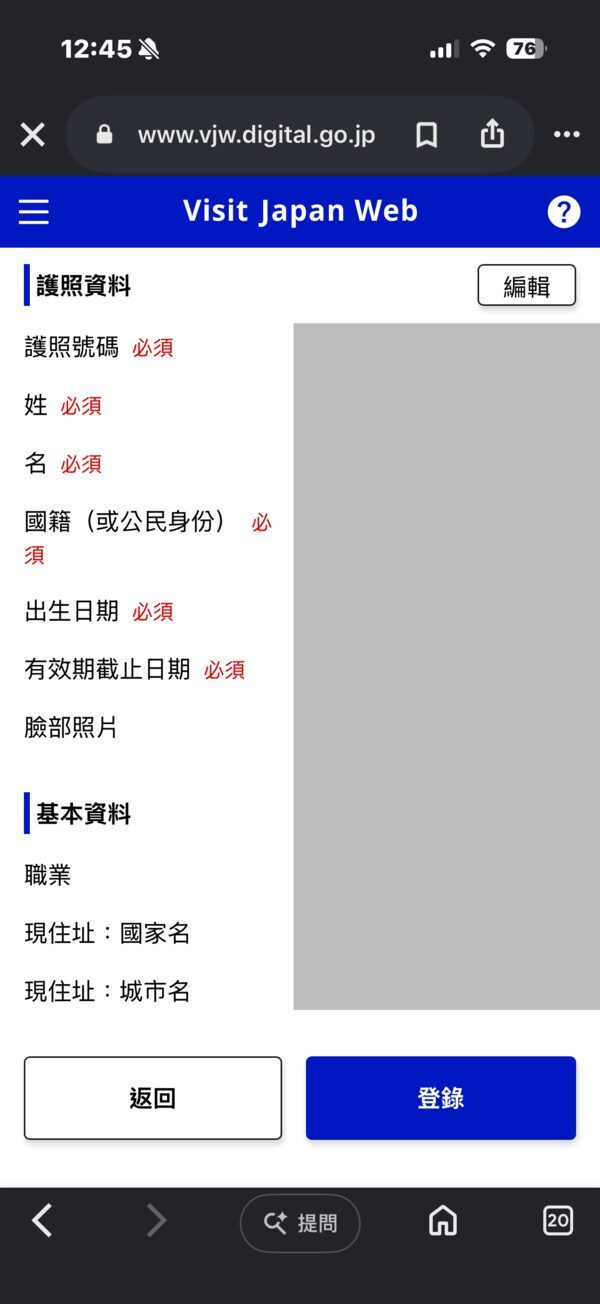
Check your passport details - Register your planned entry: add your flight and hotel. Tap the button to register a new planned entry, enter your arrival date, airline, flight number, departure city and accommodation in Japan, tick the family members on this trip, then register the plan. The trip name can be left blank; it fills in with your arrival date.
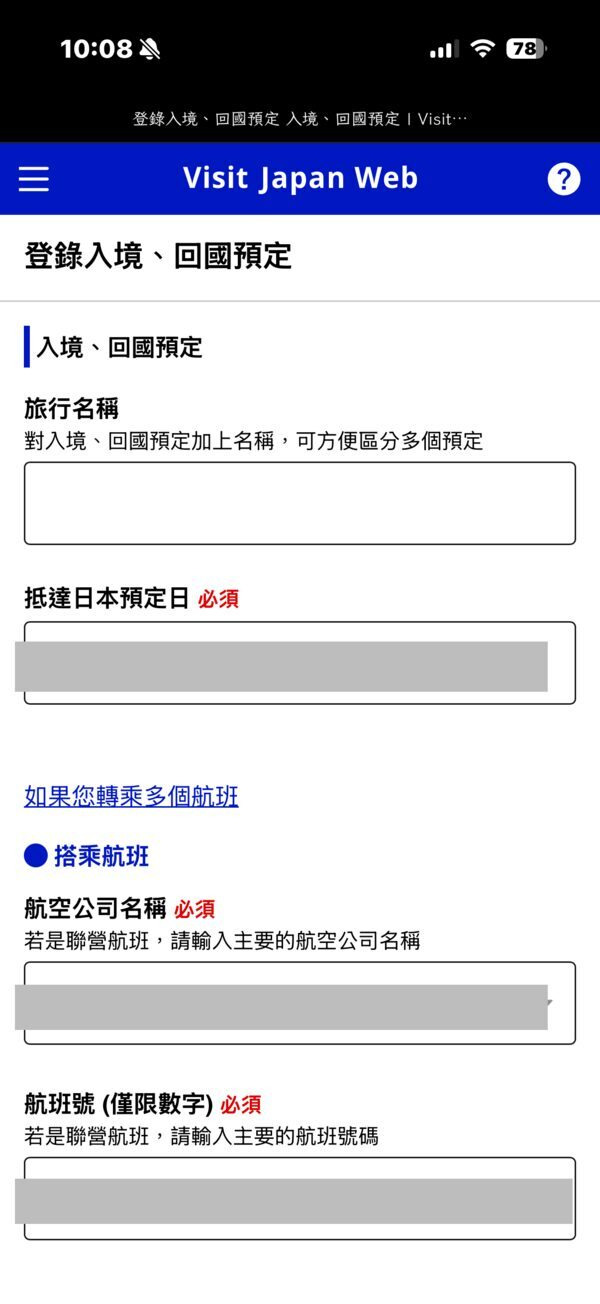
Enter arrival date and flight 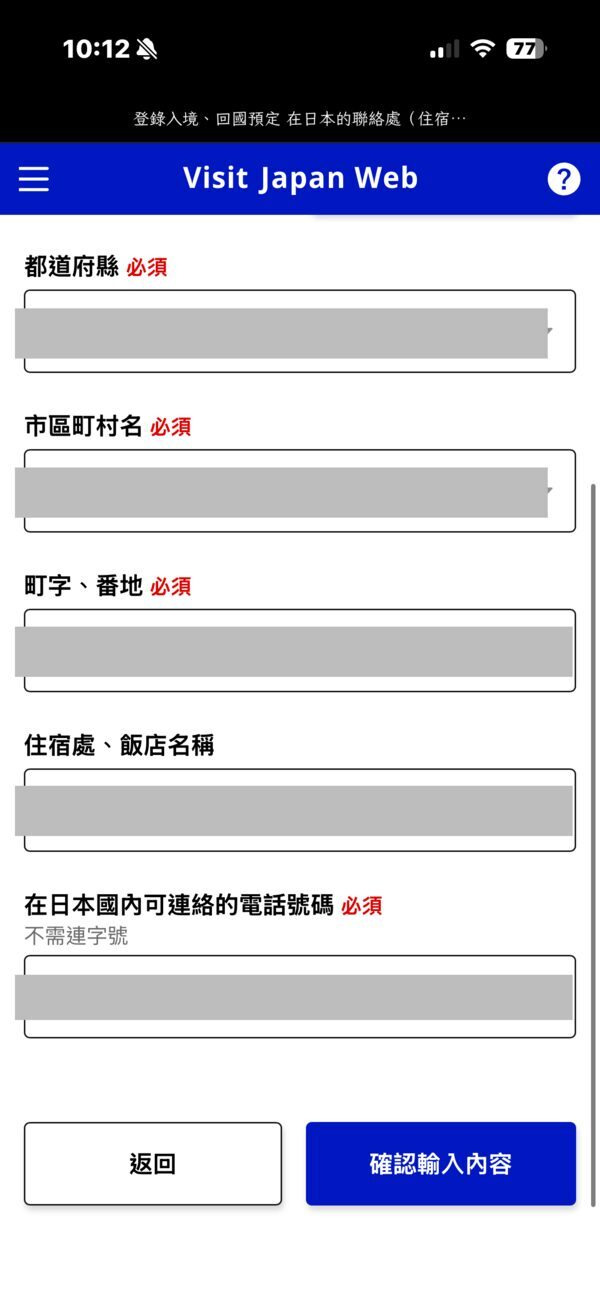
Enter your stay and phone in Japan 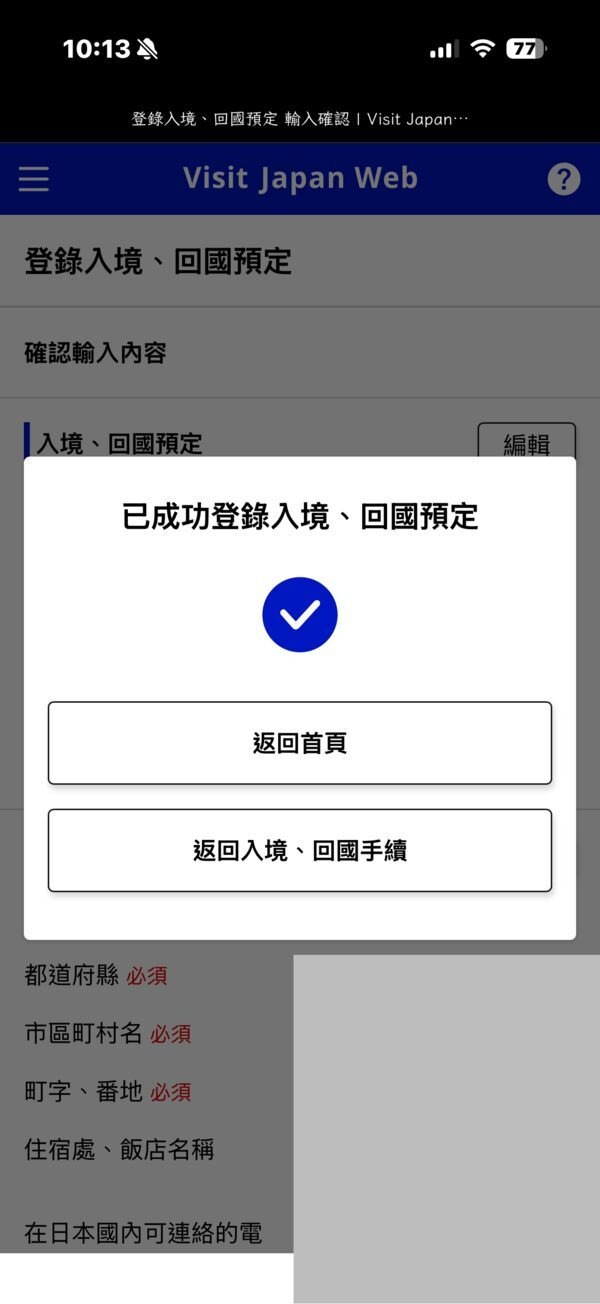
Trip registered - Complete immigration and customs: answer each yes/no question. Open the plan you just registered, answer the quarantine (health) questions, then go to "Immigration and customs declaration" to enter your occupation, address, purpose of visit, length of stay, the customs questions and the items you're carrying. Review everything, tick the box confirming the information is true, and tap "Register".
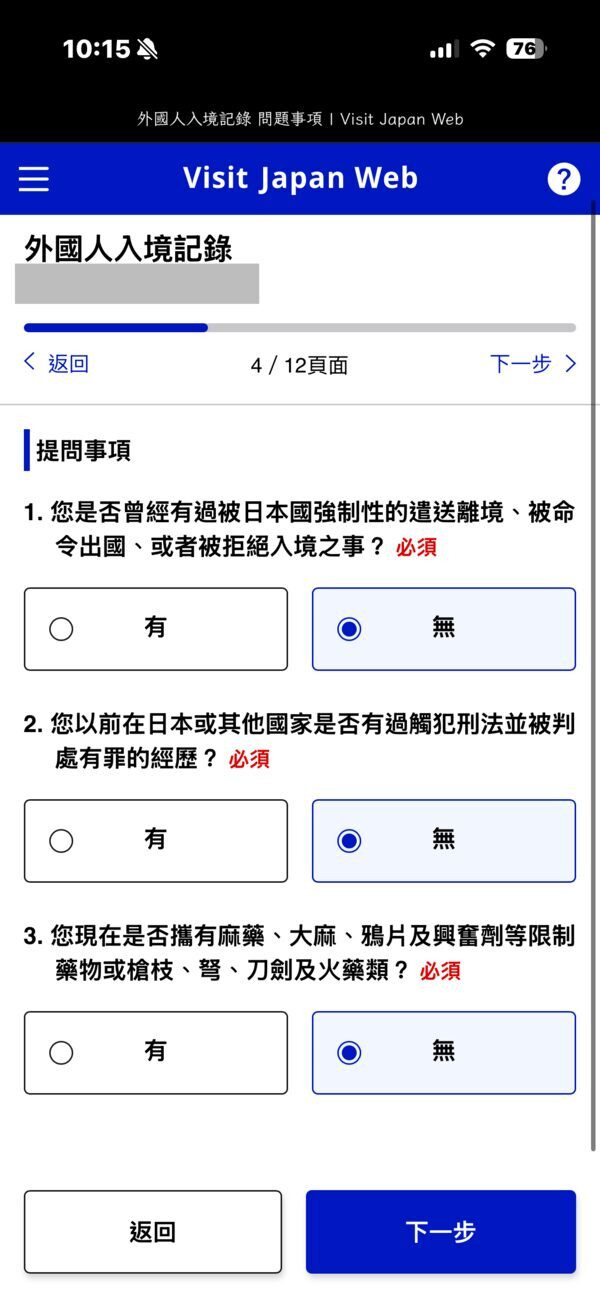
Answer the questions 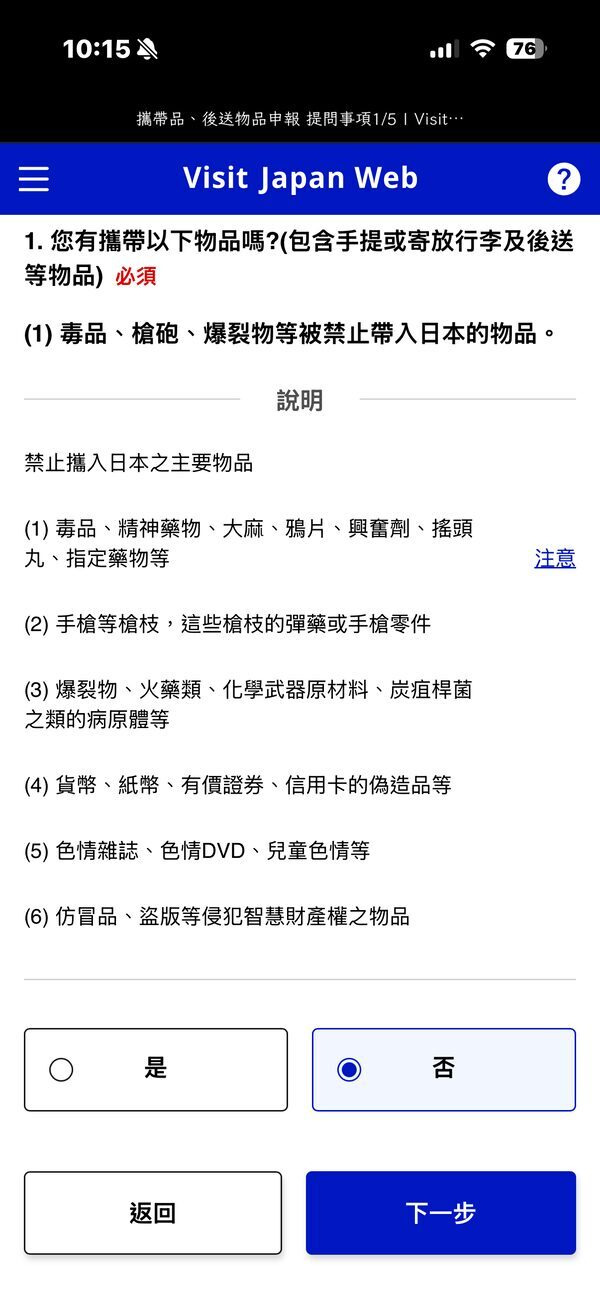
Customs declaration 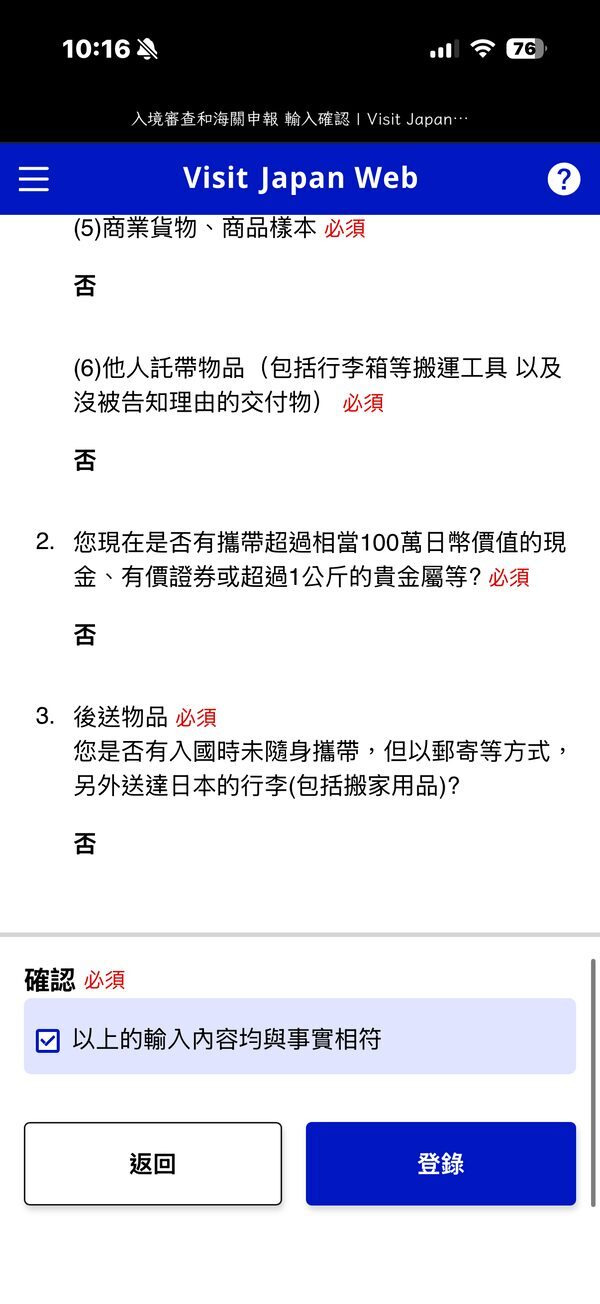
Tick the box and tap "Register" - Get your QR code: tap "Display QR code". Back on the procedures screen, tap "Display QR code", then agree to show it. If family members are on the plan, use the drop-down menu to switch to each person's QR code.
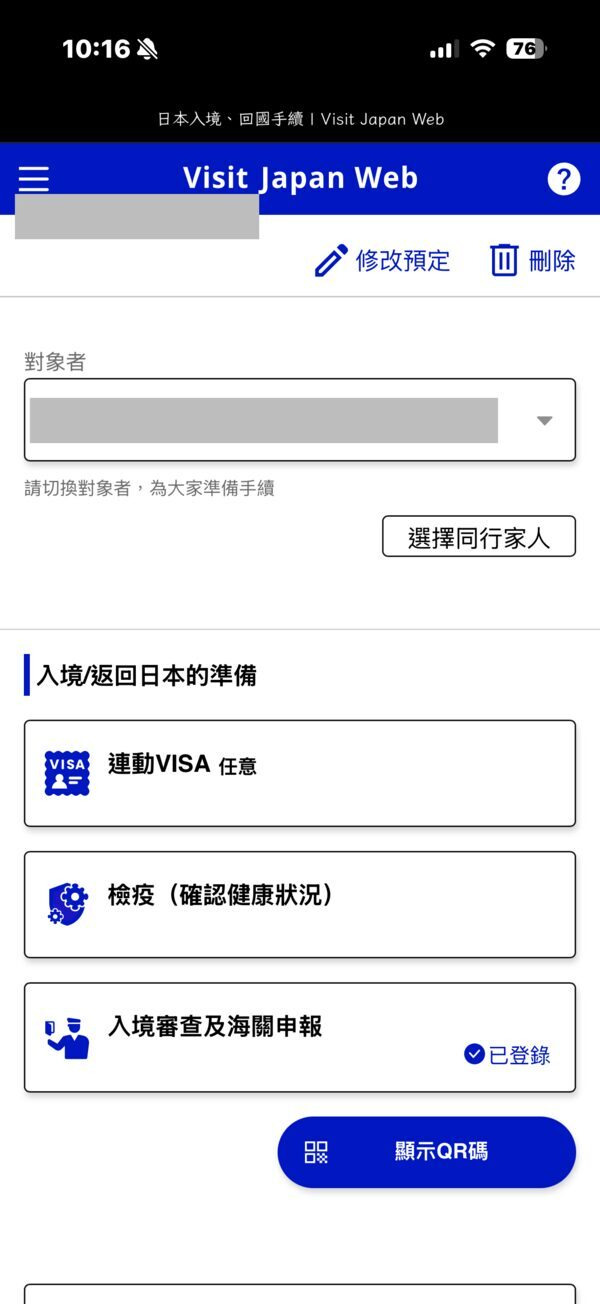
Tap "Show QR code" 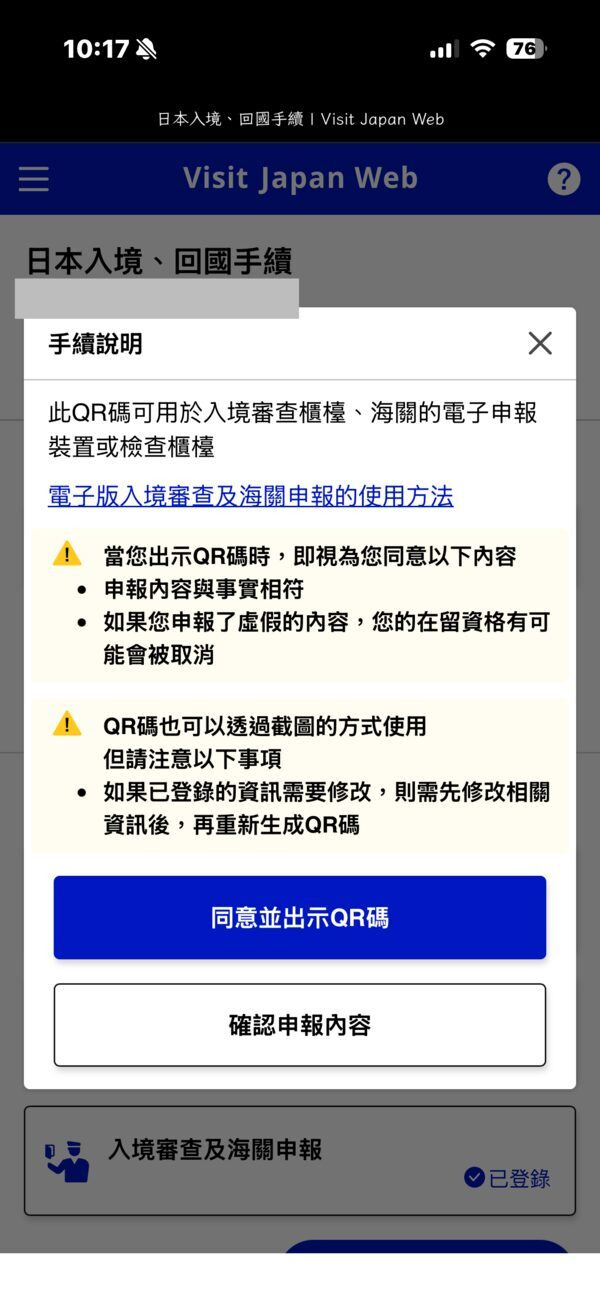
Tap "Agree and show QR code" 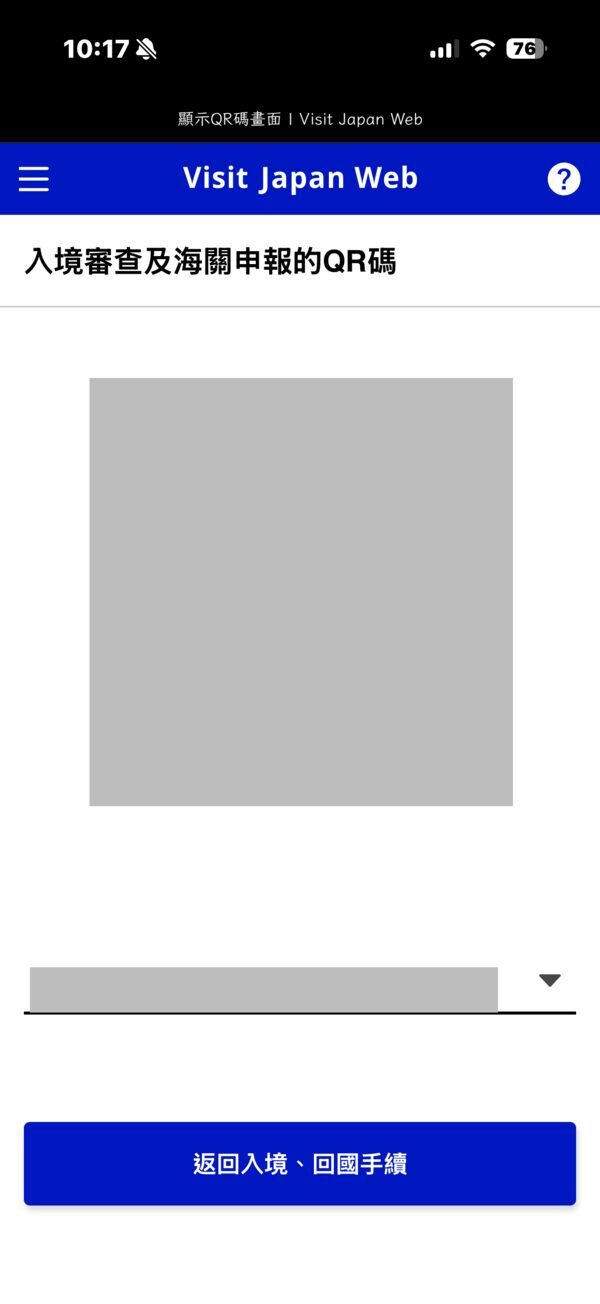
Switch QR codes for family
The customs questions ask about prohibited items, meat, fruit, vegetables, plants and animals, goods over the duty-free allowance, items carried for someone else, and cash over 1 million yen. Most tourists can honestly answer "No"; if you are bringing a lot of alcohol or tobacco, enter the quantities clearly.
How do I register kids and family members?
You can add your spouse, parents and grandparents, and children and grandchildren as family members, as long as you all enter Japan together. Siblings, parents-in-law, children's spouses and friends don't count, so they need their own accounts. Children need their own entry details too; a parent simply registers them in their account.
Family QR codes can be shown from the main traveller's phone, switching person by person with the drop-down menu. One catch: if you choose to enter customs details for the whole family together, any declaration a family member already filled in is overwritten by the main traveller's. At the airport, the joint kiosks can't be used by anyone under 135 cm tall, and at customs e-gates children under 100 cm go through with a family member.
How is the QR code used at the airport, and which airports support it?
You'll use the QR code twice: once at immigration and again at customs after baggage claim. New Chitose, Narita, Haneda, Chubu, Kansai, Fukuoka and Naha airports have electronic declaration terminals and customs e-gates: scan the QR code and your passport, and if eligible you walk straight through the gate. At Haneda, Fukuoka and Naha you can scan while waiting for your bags. At other airports, show the QR code at the immigration counter and the customs inspection desk.
Narita, Haneda, Kansai and Fukuoka also have joint kiosks that collect your passport, face photo and declaration for both immigration and customs in one go; foreign visitors then use a dedicated immigration booth. Each family member operates the kiosk separately, and masks and sunglasses must come off.
| Joint kiosk | Operating hours |
|---|---|
| Narita Terminals 1, 2, 3 | 7:00–21:30 |
| Haneda Terminal 2 | 4:30–23:30 |
| Haneda Terminal 3 | 24 hours |
| Kansai Terminal 1 | 8:00–22:00 |
| Kansai Terminal 2 | 9:00–21:00 |
| Fukuoka | 7:00–21:00 |
Kiosks at Narita Terminals 1 and 2 started on 24 September 2026; hours may change with flight schedules.
What if I get stuck?
No verification email: check your spam folder, make sure @vjw.digital.go.jp isn't blocked and that your email address is typed correctly. If you close the screen while waiting, the old code stops working and you need a new one. The camera won't read your passport: it's usually glare or misalignment, so try another angle, and if it still fails choose manual entry.
You can screenshot the immigration and customs QR code, but if you change any details you need to generate and screenshot it again; the tax-free QR code can't be screenshotted. No internet on landing isn't a problem: as long as you logged in before departure and stayed logged in, foreign visitors can show the entry QR code offline, and airport free Wi-Fi covers editing family details or other features.
If the accommodation field keeps showing an error, the hotel name probably has Chinese or Japanese characters or full-width symbols; use only half-width letters, numbers, commas, hyphens, full stops and spaces, and if you're staying at several hotels, enter the first one. For connecting flights, enter the last flight into Japan as the flight number and your original departure city. Length of stay is another common mistake: for a short tourist stay, enter 90 or fewer in the "days" field.
How do I get to my hotel after customs?
The QR code only gets you through customs. What comes next is the tiring part of any trip: dragging luggage to find transport, changing trains and hunting for lifts. It's hard to predict how long the immigration queue will take, and late-night arrivals have fewer trains to choose from. Lanytrip offers transfers from Narita and Haneda to central Tokyo, and from Kansai Airport to central Osaka and Kyoto, plus a 5-hour Tokyo private car that includes a one-way Narita or Haneda transfer. These are the 3 most common options.
- Narita Airport → your hotel in central Tokyo: Good for travellers with older parents, kids or lots of luggage who don't want to change trains at Keisei Ueno or Tokyo Station, or who land late at night.
- Haneda Airport → your hotel in central Tokyo: Good for anyone worn out after a long immigration queue who wants to get in a car and go straight to the hotel, and you can head to Yokohama or Mt Fuji directly from Haneda too.
- Kansai Airport → your hotel in central Osaka or Kyoto: Good for families with lots of luggage or a stroller who don't want to change at Namba or Kyoto Station, or who arrive on a late flight.
Recommended transfer options
Narita Airport → your hotel in central Tokyo
Get a 1-on-1 itinerary quote ›
Haneda Airport → your hotel in central Tokyo
Get a 1-on-1 itinerary quote ›
Kansai Airport → your hotel in central Osaka or Kyoto
Get a 1-on-1 itinerary quote ›
Have this ready when you ask about a transfer on LINE
- Departure hotel (name or address)
- Date of use
- Number of people and luggage (strollers, large bags)
- Your planned itinerary
For a faster, more accurate quote, please send all of the above in one message on LINE.
Summary: what to watch for and how to plan arrival
Things to watch for
Visit Japan Web is free and has no official app; ignore any site charging a fee to produce your QR code. The official address is www.vjw.digital.go.jp. The most common snags are full-width characters in the accommodation field, the length of stay and connecting flights, and entering customs details for the whole family can overwrite what others already filled in.
How to plan it
Once your flight is booked, set up your account and register yourself and your family. A day or two before departure, complete the declaration at home and screenshot the QR codes, and stay logged in. On arrival, follow the signs to a kiosk or counter, and have each family member's QR code ready before customs.
Why we suggest a pre-booked transfer
You can't know in advance how long arrival procedures will take, and you're often tired by the time you clear customs. With a transfer booked ahead, one car takes you from the arrivals hall straight to your hotel door; nobody has to haul bags on and off trains, and older parents and kids can rest as soon as they sit down. See the 3 airport transfers above, or message us on LINE.
Visit Japan Web FAQ
Do I have to use Visit Japan Web?+
No. Paper disembarkation cards and customs declarations are still accepted, and for families clearing customs together, one paper declaration filled in by the main traveller is enough.
How far in advance should I fill in Visit Japan Web?+
You just need to finish before you reach immigration, and you can fill it in any time after your flight is booked. Finishing at home and staying logged in means it works even without internet on landing.
Can I screenshot the Visit Japan Web QR code?+
Yes, for the immigration and customs QR code; after changing any details, generate it again and take a new screenshot. The tax-free QR code can't be screenshotted.
What if my flight or hotel changes?+
Edit the plan from the procedures screen and update the declaration under "Immigration and customs declaration". Take a new screenshot of the QR code afterwards.
Does Visit Japan Web cost anything? Is there an app?+
It's completely free and there is no official app. Fake sites imitate Visit Japan Web or offer to "process" your QR code for a fee; don't enter anything on a site that asks for payment.
